

WhatLetter ⭐ Verified
What is WhatLetter?
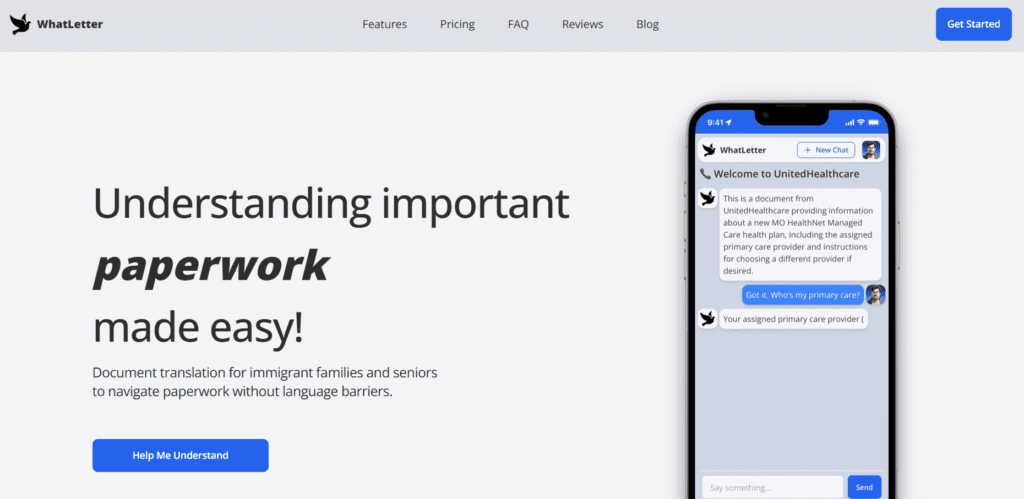
WhatLetter AI is a web-based tool that translates and simplifies documents for users who face language barriers. It is useful for immigrants, seniors, travelers, and professionals to simplify the complex paperwork. The platform is based on advanced AI models to interpret and summarize text. These AI models process visual documents, extract meaningful content, and provide explanations. This approach differentiates it from other general translators. WhatLetter AI enables users to snap, scan, and understand documents quickly, making it ideal for anyone who needs secure translations with convenience.
Review Summary
| Performance Score | B+ |
| Content Quality | Accurate translations with simplified explanations of complex text. |
| Interface | User-friendly, intuitive, and mobile-compatible web interface. |
| Ai Technology | Advanced AI models analyze documents and provide context-aware translations. |
| Purpose | Designed to make multilingual documents understandable instantly. |
| Compatibility | Works on both desktop and mobile browsers. |
| Pricing Summary | Offers the freemium pricing model. |
WhatLetter Key Features
| 1 | Scan documents for instant translation |
| 2 | Use an AI chatbot for interactive guidance |
| 3 | Supports 30+ languages |
| 4 | Privacy-focused processing |
| 5 | Real-time translation and summarization |
Who is Best for Using WhatLetter?
WhatLetter AI is a web-based tool that translates and simplifies documents for users who face language barriers.
Is WhatLetter Free?
WhatLetter offers a free plan with limited features. Paid plans start at $1.99/month
Pros & Cons
Pros
- Easy-to-use interface for casual and professional users
- Supports multiple languages
- Free plan available with basic features for testing
- Secure document processing
- Real-time explanations through an AI chatbot
Cons
- Offers limited features on the free plan
- No dedicated mobile app available
- Some languages may not be supported fully
- Requires internet for AI chatbot functionality
- Advanced features are locked in the premium plan



