
Discover, Compare & Master Find the best AI tools for your next project in seconds. Check our latest AI insights

Spline AI

Verified Featured

Spline AI creates 3D models, animations, & interactive designs in browser. Review covers pricing, features, & real workflow use cases clearly.

4.7/5 editorial rating 948 upvotes
  • Main category: 3D
  • Subcategory: AI 3D Model Generator
  • Pricing: Freemium
  • Web
  • Extension
  • Best For Designing interactive 3D experiences, animations, and web visuals with real-time collaboration and AI-assisted generation
  • Free Trial yes
  • Reviewed By Waleed Fayyaz
  • Last Updated April 18, 2026

Editorial note: ratings and verdicts on this page are internal editorial assessments, not third-party user review averages.
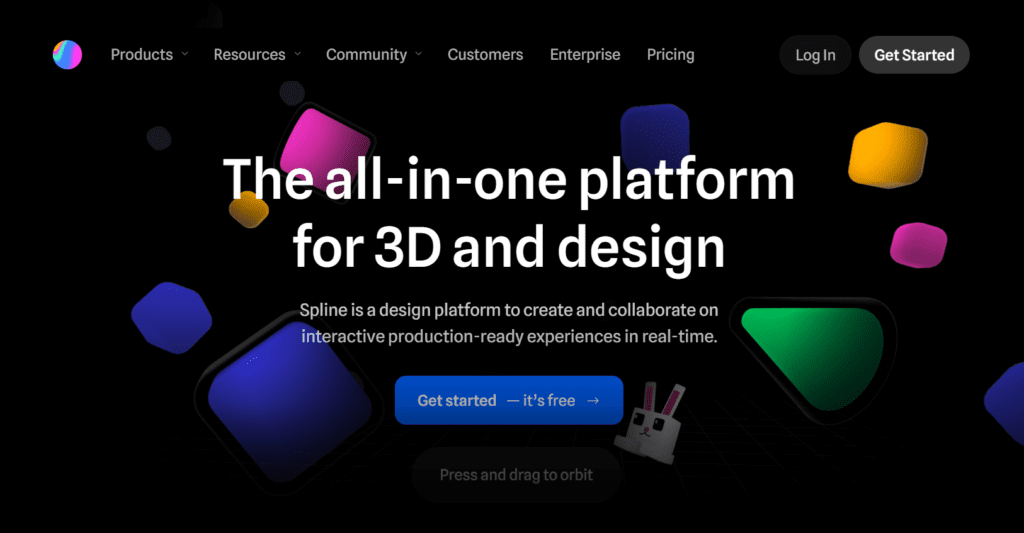
Spline AI Verdict

Spline provides strong functional value for designers and developers who need interactive 3D content without complex software. The freemium model allows entry-level usage, while paid plans unlock collaboration and AI generation features. It suits UI designers, web developers, and creative teams. It is less suitable for users requiring advanced CAD-level precision or high-end 3D rendering pipelines.

What Is Spline AI?

Spline is a browser-based 3D design platform that allows users to create, animate, and publish interactive 3D scenes. It enables real-time collaboration, making it suitable for teams building web-based visual experiences. Users can design directly in the browser without installing heavy software.
The platform includes AI-powered tools such as text-to-3D and image-to-3D generation. These features use generative AI models to convert prompts and images into 3D objects, textures, and scenes. It also supports AI texture generation and style transfer for refining visual outputs.
In professional workflows, Spline functions as a design and prototyping layer for interactive web experiences. Designers use it to create 3D UI elements, product visuals, and animations, then embed them directly into websites or apps. Its real-time collaboration and export capabilities support modern web and product design pipelines.

Review Summary

  • Performance Score A
  • Content Quality Produces interactive 3D visuals with consistent rendering and usable assets for web integration
  • Interface Intuitive browser-based editor with drag-and-drop controls and real-time preview
  • Ai Technology Generative AI, Computer Vision, 3D modeling algorithms
  • Purpose Create, animate, and deploy interactive 3D content for web and design projects
  • Compatibility Web app, macOS, Windows, exports for web embedding and integration with design tools
  • Pricing Summary Freemium model with free plan and paid tiers unlocking collaboration, exports, and AI features

Spline AI Key Features

  • 1

    Text-to-3D model generation

  • 2

    Image-to-3D conversion

  • 3

    Real-time collaboration editor

  • 4

    Interactive 3D animations

  • 5

    Web embedding and export tools

  • 6

    AI texture and style generation

  • 7

    Physics and interaction controls

Who Should Use Spline AI?

Is Spline AI Worth It?

Spline AI offers a free starting point, while paid plans may make sense for heavier or team-based use.

Pros And Cons

Pros

  • Works directly in browser without installation
  • Supports real-time team collaboration
  • Includes AI tools for faster 3D creation
  • Easy integration into websites and apps

Cons

  • Limited precision compared to advanced 3D software
  • Some AI features require paid plans
  • Performance depends on browser capability
  • Not ideal for complex high-detail modeling

Spline AI Pricing

Free

$0/month

  • basic 3D design,
  • limited exports,
  • community projects

Professional

$9/month

  • custom domains,
  • higher exports,
  • collaboration

Team

$12+/month per user

  • team collaboration,
  • shared workspaces

Enterprise

Custom pricing

  • advanced security,
  • API,
  • team scaling

Frequently Asked Questions