Discover, Compare & Master Find the best AI tools for your next project in seconds. Check our latest AI insights

Anomaly AI

Verified

Anomaly AI analyzes spreadsheets & databases with AI, transparent SQL, dashboards, anomaly detection, & team reporting for larger data workflows at scale.

4.5/5 editorial rating 854 upvotes
  • Main category: business
  • Subcategory: AI Analytics Assistant
  • Pricing: Freemium
  • Web
  • Best For Teams that analyze large spreadsheets or database tables and need AI-generated dashboards, transparent SQL, and anomaly detection without moving into a full BI stack.
  • Free Trial Yes
  • Reviewed By Waleed Fayyaz
  • Last Updated April 21, 2026

Editorial note: ratings and verdicts on this page are internal editorial assessments, not third-party user review averages.

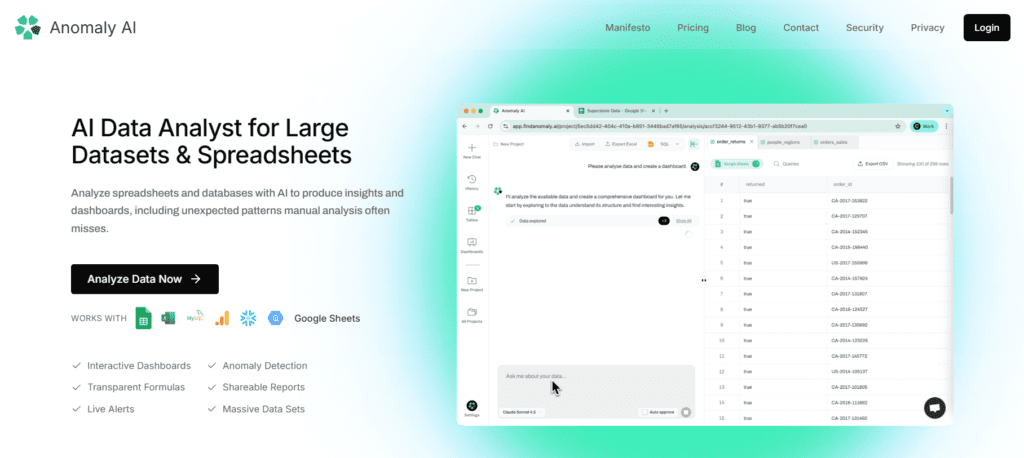
Anomaly AI Data Analyst for Large Datasets & Spreadsheets

Anomaly AI Verdict

Anomaly AI justifies its cost for teams that want natural-language analysis on spreadsheets and warehouse data with visible SQL, shareable dashboards, and pooled team usage. The free plan lowers evaluation risk, and the paid tiers stay simple up to team scale. It fits operators, analysts, agencies, and business teams that still work in spreadsheet-style flows but need stronger analysis, cleaner data handling, and more reliable reporting on larger datasets.

What Is Anomaly AI?

Anomaly AI is a web-based AI data analyst for large datasets and spreadsheets. It connects to files and data sources such as CSV, Excel, Google Sheets, MySQL, BigQuery, Snowflake, and GA4 exports. The product focuses on analysis, dashboards, reports, anomaly detection, and live alerts for teams working beyond standard spreadsheet limits.
The product uses large language models for natural-language data analysis and SQL generation. Its security documentation states that it does not host its own foundation models and instead uses external LLM providers through enterprise API agreements. It also states that, for SQL generation, only schemas and a small sample of 3 to 5 rows are sent for context, while full datasets are not sent to the LLM, and generated SQL runs locally in an isolated read-only environment.
In professional workflows, Anomaly AI fits teams that need a direct path from raw data to dashboards. Its product flow is organized around upload, clean, transform, and visualize steps. The platform automates data preparation tasks such as duplicate removal, date standardization, missing-value handling, and outlier detection, then turns the cleaned data into dashboards and reports that teams can share.


Review Summary

  • Performance Score A
  • Content Quality The tool produces dashboards, insights, and SQL-backed analysis that users can verify through transparent queries and formulas.
  • Interface The interface follows a clear upload, clean, transform, and visualize workflow that suits spreadsheet and database analysis tasks.
  • Ai Technology LLM-based natural-language analytics, SQL generation, automated data preparation, and anomaly detection.
  • Purpose Its main objective is to help teams query, visualize, and extract insights from spreadsheet and database data with AI.
  • Compatibility CSV, Excel, Google Sheets, MySQL, BigQuery, Snowflake, and GA4 exports, with PostgreSQL listed as coming soon.
  • Pricing Summary Anomaly AI uses a freemium model with Analysis Units, starting at a free plan and scaling through Starter, Pro, Team, and custom Enterprise tiers.

Anomaly AI Key Features

  • 1

    Transparent SQL queries

  • 2

    Interactive dashboards

  • 3

    Anomaly detection

  • 4

    Shareable reports

  • 5

    Automated data cleaning

  • 6

    Live alerts

  • 7

    Multi-source data connectors

  • 8

    Team usage controls

Who Should Use Anomaly AI?

Is Anomaly AI Worth It?

Anomaly AI offers a free starting point, while paid plans may make sense for heavier or team-based use.

Pros And Cons

Pros

  • Free plan includes all supported data sources.
  • SQL output is visible and reviewable before use.
  • Supports both file uploads and cloud or database connectors.
  • Security documentation is unusually detailed for a young analytics product.

Cons

  • Public mobile or desktop apps are not listed.
  • Enterprise features such as SSO, SLA, and advanced security are reserved for custom plans.
  • PostgreSQL support is not live yet.
  • Usage is capped by monthly Analysis Units on every public tier.

Anomaly AI Pricing

Free

$0/month

  • 30 Analysis Units/month,
  • all data sources supported,
  • core analysis features,
  • live chat support

Starter

$16/month

  • 200 Analysis Units/month,
  • shareable dashboards,
  • email support

Pro

$32/month

  • 500 Analysis Units/month,
  • auto report scheduling,
  • priority support

Team

$300/month

  • 6,000 shared Analysis Units/month,
  • team visibility,
  • collaboration and admin controls

Enterprise

Custom Pricing

  • custom Analysis Units,
  • volume discounts,
  • dedicated support, SSO, SLA,
  • advanced security

Frequently Asked Questions